The XmlExtractor is a class that will parse XML very efficiently with the XMLReader object and produce an object (or array) for every item desired. This class can be used to read very large (read GB) XML files
$rootTags Specify how deep to go into the structure before extracting objects. Examples are below
$filename Path to the XML file you want to parse. This is optional as you can pass an XML string with loadXml() method
$returnArray If true, every iteration will return items as an associative array. Default is false
$mergeAttributes If true, any attributes on extracted tags will be included in the returned record as additional tags. Examples below
Methods
XmlExtractor.loadXml($xml)
Loads XML structure from a php string
XmlExtractor.getRootTags()
This will return the skipped root tags as objects as soon as they are available
XmlItem.export($mergeAttributes = false)
Convert this XML record into an array. If $mergeAttributes is true, any attributes are merged into the array returned
XmlItem.getAttribute($name)
Returns the record’s named attribute
XmlItem.getAttributes()
Returns this record’s attributes if any
XmlItem.mergeAttributes($unsetAttributes = false)
Merges the record’s attributes with the rest of the tags so they are accessible as regular tags. If unsetAttributes is true, the internal attribute object will be removed
The first constructor argument is a slash separated tag list that communicates to XmlExtractor that you want to extract “person” records (last tag entry) from earth -> people structure.
The export method on the $person object returns it in array form, which will look like this:
There are a number of things going on with the above XML.
The two root tags that we have to skip to get to our items have information attached.
We can get at these with the getRootTags() method. The next issue is that both items are using attributes to define their data.
This example is a bit contrived, but it will show the functionality behind the mergeAttributes feature.
By the end of this example, we will have two items with identical structure.
Once “compressed” (exported with merged attributes) the structure of both items is the same.
In the event of an attribute having the same name as the tag, the tag takes precedence and is never overwritten.
The two items will end up looking like this:
Reflections on NY Phil — The NY Phil as a lens on changes in US society
html_document
Around the turn of the century, New York City became the arts center of the world. Its establishment not only encouraged the flourishing of American musicians but also attracted musicians from all over the world to NYC. NY Philharmonic as an important art and culture institution, reflects the social and economic changes of the United States society over time. In this study I focus on NY Philharmonic data from three perspectives: 1. the nationality of composers whose works are performed by NY Philharmonic in relation to the political enviroments of the US; 2. the status of women composers over time; 3. the elasticity of an art and culture institute’s reaction to social issues by comparing NY Phil performance data and MoMA exhibition data.
The following graph shows that most of the composers’ works got performed fewer than ten times, and only 16 composers’ works are performed more than 1000 times. Therefore, I expect the composers to be diverse.
require(mosaic)
nrow(SumComp1)
hist(SumComp1$SumComp,main="number of performance histogram",xlab="number of performance")

comp1000=subset(SumComp1,SumComp>=1000)
nrow(comp1000)
comp1000

compl1000=subset(SumComp1,SumComp<=10)
nrow(compl1000)
hist(compl1000$SumComp,main="number of performance histogram",xlab="number of performance")
According to Marx, economics base determines the superstructure of the society, which is reflected as the economic development level determines the politics, art and culture activity of a society. Originally, I was thinking of studying the relationship between the number of contemporary composers’ works performed at NY Philharmonic and the GDP growth rate to see how the number of contemporary composers work performed reflects society’s emphasis on art and music education. But the list of composers’ birth and death year is incomplete. Therefore I cannot determine which composers are alive at the time their works are performed by the NY Phil. Thus in order to see the relationship between US economic development and NY Phil performances, I decided to study the relationship between the number of concerts in each season and US GDP growth rate. The graph shows that GDP growth rate and performance don’t have similar patterns. However, from a micro perspective, the number of performance per year reflects the NY Phil’s own economic condition. For example, the boom of the number of performance at the beginning of the twentieth century is explained by recognizing that several orchestras merged.
3.Normalized Performance Frequency Score
Because the number of performance change year by year, I computed a “Normalized Performance Frequency Score” to normalize by total number of performances. I got the normalized performance frequency score by dividing the number of performances for each composers in each season by the total number of performance in each season.
require(base)
composerBySeasonComplete[is.na(composerBySeasonComplete)] <- 0
composerBySeasonComplete1=composerBySeasonComplete[2:175]
composerBySeasonComplete2=composerBySeasonComplete[1]
popScoreComposerComplete=data.frame()
totalNumConcert=colSums(composerBySeasonComplete1, na.rm=TRUE)
for ( i in 1:2652){
  popScoreComposerComplete[i,]=composerBySeasonComplete1[i,]/totalNumConcert
  i=i+1
}
popScoreComposerComplete=cbind(composerBySeasonComplete2,popScoreComposerComplete)
write.csv(popScoreComposerComplete,"popScoreComposerComplete.csv")
the Normalized Performance Frequency Score table looks like:
art and politics can affect each other. In this part, I want to ask several questions:
As NYC rise to be the center of art and culture, does the number of American composers’ works increase?
Does the number of German composers’ work decrease during WWI and WwII?
Does the number of Russian composers’ work decrease during the cold war?
As the economy rises in Asian and Latin American countries, does the number of works from these areas increase over time?
To do this we need to identify the nationality of composers whose works are performed by the NY Philharmic. The NY Philharmonic data do not have the nationalities of composers. Therefore, I scraped wikipedia page and got data on composers’ nationalities.
I got the most of the composers nationality scores by scraping this page and the links in the page: (https://en.wikipedia.org/wiki/Category:Classical_composers_by_nationality) using the following python code
####American.
I stacked the data from multiple pages, cleaned them and matched them with the normalized performance frequency score table and computed the proportion of the number of American composers whose works are performed by the NY Philharmonic over total number of works performed by the NY Philharmonic over time.
The graph shows a general increase of the proportion of the number of American composers over total number of composers over time which reinforces the hypothesis that as America rise to become the center of the art and culture of the world during the turn of the century its composers got more recognitions by the NY Philharmonic.
load("germanComps.RData")

l=c()
for ( i in 1:length(german1.3)){
  l=c(l,which(german1.3[i]==popScoreComposerComplete$composers))
}
german=popScoreComposerComplete$composers[l]
germanPop=popScoreComposerComplete[l,]
germanPopSum=colSums(germanPop[2:175])
qplot(seq_along(germanPopSum),germanPopSum)+geom_line()+ylim(0,1)+geom_area(colour="black")+scale_x_continuous(breaks=seq(1,175,10),labels=c("1842","1852","1862","1872","1882","1892","1902","1912","1922","1932","1942","1952","1962","1972","1982","1992","2002","2012"))+ theme(axis.text.x = element_text(angle = 45,size=10, hjust = 1))+xlab("seasons")+ylab("percentage of works being performed")+ggtitle("German Composers")
the graph shows a significant decrease in the proportion of German composers’ works being performed during WWI and WWII and after WWII.
wagner=as.numeric(popScoreComposerComplete[81,2:175])
qplot(seq_along(wagner),wagner)+geom_line()+ylim(0,1)+geom_area(colour="black")+scale_x_continuous(breaks=seq(1,175,10),labels=c("1842","1852","1862","1872","1882","1892","1902","1912","1922","1932","1942","1952","1962","1972","1982","1992","2002","2012"))+ theme(axis.text.x = element_text(angle = 45,size=10, hjust = 1))+xlab("seasons")+ylab("percentage of works being performed")+ggtitle("Wagner")
The graph shows that the normalized performance frequency score of Hitler’s favorite composer, Wagner, significantly decreased after WWII.
Russian
russian1=read.csv("russiantest1.csv", header = FALSE ,encoding = "UTF-8")
russian2=read.csv("russiantest2.csv", header = FALSE ,encoding = "UTF-8")
russian=c(russian1,russian2)
russian=unique(unlist(russian))

russian1.0=gsub("\\(composer)","",russian)
russian1.0=gsub("\\(conductor)","",russian1.0)
russian1.1=strsplit(as.character(russian1.0)," ")

russian1.2=list(rep(0,length(russian1.1)))
for ( i in 1:length(russian1.1)){
  if (length(russian1.1[[i]])>1)
    russian1.2[i]=paste(russian1.1[[i]][length(russian1.1[[i]])],paste(russian1.1[[i]][1:length(russian1.1[[i]])-1], collapse=" "),sep=", ")
}
russian1.2=russian1.2[!is.na(russian1.2)]

test2=partialMatch(popScoreComposerComplete$composers,russian1.2)
test3=test2[-c(38,35,33,29),]
russian1.3=test3$raw.x
save(russian1.3,file="russianComps.RData")
load("russianComps.RData")
l=c()
for ( i in 1:length(russian1.3)){
  l=c(l,which(russian1.3[i]==popScoreComposerComplete$composers))
}

russian=popScoreComposerComplete$composers[l]
russianPop=popScoreComposerComplete[l,]
russianPopSum=colSums(russianPop[2:175])
qplot(seq_along(russianPopSum),russianPopSum)+geom_line()+ylim(0,1)+geom_area(colour="black")+scale_x_continuous(breaks=seq(1,175,10),labels=c("1842","1852","1862","1872","1882","1892","1902","1912","1922","1932","1942","1952","1962","1972","1982","1992","2002","2012"))+ theme(axis.text.x = element_text(angle = 45,size=10, hjust = 1))+xlab("seasons")+ylab("percentage of works being performed")+ggtitle("Russian Composers")
The graph shows that there is an increase in normalized performance frequency score of Russian composers after WWII during the cold war, probably because many important Russian composers rise during that time. This shows that the cold war did not affect the introduction of Russian music to the US.
In conclusion, overt war and internal censorship may affect cultural performances and people’s attitudes toward music, but vaguer antipathy, as in the Cold War, may not influence the frequency of cultural performances. This is reflected on the choice of NY Phil reportories. During the culture revolution in China, Western art works are strictly prohibited. Censorship affected Chinese music and art institutions’ reportorie choice. Comparing China to the United States, it suggests that, in a democratic society, attitudes and censureship somestimes do not affect art and culture performance much which is shown by the proportion of Russian works being performed increasing during the cold war. However, during actual wartime attitudes do affect art and culture performances, which is shown by the proportion of German composers’ performances diminishing during and after the war years.
Chinese
In order to see how the economic rise of Asia and Latin American countries affect the performance history at NY Phil, I needed to come up with a coherent list of Asian and Latin American composers. But I could not find these data. Instead, I used China as a single-country sample to see how the performance trends change over time as the economy of China rose.
In order to do that, I find a list of common Chinese last names and mathced it with composers’ last names. This matching algorithm finds every composers with Chinese ethnitiy rather than with actual Chinese nationality.
load("ChineseLastName.RData")
splitname=strsplit(popScoreComposerComplete$composers,",")
lname=c()
for ( i in 1:length(splitname)){
  lname=c(lname,splitname[[i]][1])
}

l=c()
for ( i in 1:length(ChineseLname)){
   l=c(l,which(ChineseLname[i]==lname))
}

asianPop=popScoreComposerComplete[l,]
nrow(asianPop)
nrow(asianPop)/nrow(popScoreComposerComplete)

asianTop=rowSums(asianPop[2:175],na.rm=TRUE)
asianTop=cbind(as.data.frame(asianPop)[1],asianTop)
asianTop1=asianTop[order(-asianTop$asianTop),]
head(unique(asianTop1),20)

asian=popScoreComposerComplete$composers[l]
asianPop=popScoreComposerComplete[l,]
asianPopSum=colSums(asianPop[2:175])
qplot(seq_along(asianPopSum),asianPopSum)+geom_line()+ylim(0,1)+geom_area(colour="black")+scale_x_continuous(breaks=seq(1,175,10),labels=c("1842","1852","1862","1872","1882","1892","1902","1912","1922","1932","1942","1952","1962","1972","1982","1992","2002","2012"))+ theme(axis.text.x = element_text(angle = 45,size=10, hjust = 1))+xlab("seasons")+ylab("percentage of works being performed")+ggtitle("Chinese Composers")
The graph shows that as the economy of China rose, the proportion of Chinese composers’ works being performed did not increase significantly over time. I expect the reason to be not only are there not many Chinese composeres but also there are culture communication barriers between China and the United States. As the economy of China develops, there are more and more Chinese musicians as more money and effort is put into music and art education. However, most of them are performers rather than composers. Western music and western music education was introduced to China only after the beginning of the twentieth century, so the history of western music is still relatively short in China. In addition, during the culture revolution, China was again isolated from the rest of the world. Therefore, even though there are good Chinese composers, their works are not introduced to the US.
####French
I also did French and Italian composers performance hisotry graphs over time in order to compare them with MoMA exhibition history data.
load("frenchComps.RData")
l=c()
for ( i in 1:length(french1.3)){
  l=c(l,which(french1.3[i]==popScoreComposerComplete$composers))
}

french=popScoreComposerComplete$composers[l]
frenchPop=popScoreComposerComplete[l,]
frenchPopSum=colSums(frenchPop[2:175])
qplot(seq_along(frenchPopSum),frenchPopSum)+geom_line()+ylim(0,1)+geom_area(colour="black")+scale_x_continuous(breaks=seq(1,175,10),labels=c("1842","1852","1862","1872","1882","1892","1902","1912","1922","1932","1942","1952","1962","1972","1982","1992","2002","2012"))+ theme(axis.text.x = element_text(angle = 45,size=10, hjust = 1))+xlab("seasons")+ylab("percentage of works being performed")+ggtitle("French Composers")
load("italianComps.RData")

l=c()
for ( i in 1:length(italian1.3)){
  l=c(l,which(italian1.3[i]==popScoreComposerComplete$composers))
}

italian=popScoreComposerComplete$composers[l]
italianPop=popScoreComposerComplete[l,]
italianPopSum=colSums(italianPop[2:175])
qplot(seq_along(italianPopSum),italianPopSum)+geom_line()+ylim(0,1)+geom_area(colour="black")+scale_x_continuous(breaks=seq(1,175,10),labels=c("1842","1852","1862","1872","1882","1892","1902","1912","1922","1932","1942","1952","1962","1972","1982","1992","2002","2012"))+ theme(axis.text.x = element_text(angle = 45,size=10, hjust = 1))+xlab("seasons")+ylab("percentage of works being performed")+ggtitle("Italian Composers")
####The status of Women Composers
The feminist movements accelerated in 1960s. It first starts in political and economic equality between men and women, and spread to the culture sectors. Can we find this reflected in NY Phil performance data?
I cannot find a comprehensive list of woman composers in the world. I took American composer as a smaple and examined the proportion of American womem composers’ work being performed over time by NY Phil. To do this, I scraped this page (http://names.mongabay.com/female_names.htm) and got a list of common American female first names and matched them with the NY Phil record.
load("femalenames.RData")
names=americansPop[1]$composers
splitName2=strsplit(names,",")
fname=c()
for (i in 1:length(splitName2)){
  fname=c(fname,splitName2[[i]][2])
}
fname=tolower(fname)
fname=trimws(fname)
fname3=strsplit(fname," ")
fname4=c()
for (i in 1: length(fname3)){
  fname4=c(fname4,fname3[[i]][1])
}


l=c()
for ( i in 1:length(femalenames)){
   l=c(l,which(femalenames[i]==fname4))
}

woman=americansPop[l,1]
woman

womanTrue=woman[-c(8,15,16,19,22)]
womanTrue

length(womanTrue)/nrow(americansPop)

womanPop=americansPop[l,]
womanPop=womanPop[-c(8,15,16,19,22),]
womanPopSum=colSums(womanPop[2:175])
qplot(seq_along(womanPopSum),womanPopSum)+geom_line()+ylim(0,1)+geom_area(colour="black")+scale_x_continuous(breaks=seq(1,175,10),labels=c("1842","1852","1862","1872","1882","1892","1902","1912","1922","1932","1942","1952","1962","1972","1982","1992","2002","2012"))+ theme(axis.text.x = element_text(angle = 45,size=10, hjust = 1))+xlab("seasons")+ylab("percentage of works being performed")+ggtitle("Americna Women Composers")
There are also some gender neutral names in the female first name list. Thus, some of the people in the list could be male. I removed them by hand. The graph shows that as time changes, the proportion of women composers’ works being performed did not increase significantly over time, which reflects the sad situation of women in classical music.
Art from MoMA
To compare with how NY Phil performance history reflects the change of American society, I decide to do a series of MoMA exhibition history graphs by country.
qplot(seq_along(pamerican),pamerican)+geom_line()+ylim(0,1)+geom_area(colour="black")+ theme(axis.text.x = element_text(angle = 45,size=10, hjust = 1))+scale_x_continuous(breaks=seq(1,90,by=10),labels=c("1929","1939","1949","1959","1969","1979","1989","1999","2009"))+xlab("years")+ylab("percentage of works being exhibited")+ggtitle("American Artists")
qplot(seq_along(pgermanAustria),pgermanAustria)+geom_line()+ylim(0,1)+geom_area(colour="black")+ theme(axis.text.x = element_text(angle = 45,size=10, hjust = 1))+scale_x_continuous(breaks=seq(1,90,by=10),labels=c("1929","1939","1949","1959","1969","1979","1989","1999","2009"))+xlab("years")+ylab("percentage of works being exhibited")+ggtitle("German Artists")
qplot(seq_along(psoviet),psoviet)+geom_line()+ylim(0,1)+geom_area(colour="black")+ theme(axis.text.x = element_text(angle = 45,size=10, hjust = 1))+scale_x_continuous(breaks=seq(1,90,by=10),labels=c("1929","1939","1949","1959","1969","1979","1989","1999","2009"))+xlab("years")+ylab("percentage of works being exhibited")+ggtitle("Russian Artists")
qplot(seq_along(pfrench),pfrench)+geom_line()+ylim(0,1)+geom_area(colour="black")+ theme(axis.text.x = element_text(angle = 45,size=10, hjust = 1))+scale_x_continuous(breaks=seq(1,90,by=10),labels=c("1929","1939","1949","1959","1969","1979","1989","1999","2009"))+xlab("years")+ylab("percentage of works being exhibited")+ggtitle("French Artists")
qplot(seq_along(pitalian),pitalian)+geom_line()+ylim(0,1)+geom_area(colour="black")+ theme(axis.text.x = element_text(angle = 45,size=10, hjust = 1))+scale_x_continuous(breaks=seq(1,90,by=10),labels=c("1929","1939","1949","1959","1969","1979","1989","1999","2009"))+xlab("years")+ylab("percentage of works being exhibited")+ggtitle("Italian Artists")
sum(asianLatin)
sum(asianLatin)/nrow(moma.1)
qplot(seq_along(pasianLatin),pasianLatin)+geom_line()+ylim(0,1)+geom_area(colour="black")+ theme(axis.text.x = element_text(angle = 45,size=10, hjust = 1))+scale_x_continuous(breaks=seq(1,90,by=10),labels=c("1929","1939","1949","1959","1969","1979","1989","1999","2009"))+xlab("years")+ylab("percentage of works being exhibited")+ggtitle("Chinese Artists")
the graphs show that MoMA exhibition history is more sensitive to changes in US social pressures than the NY Philharmoic performance history. For example, during WWII, the exhibitions of German artists’ work at MoMA are very infrequent. But later, before and after Berlin Wall fell when Americans had lots of sympathy for Germans, there is a big peak in the frequency of German artists’ exhibitions. The fluctuation is smaller for the NY Phil composer-frequency data when compared with the peaks in MoMA’s exhibition frequency data.
This might be because art, as relected by curatorial and exhibition selections, is actually more sensitive to social pressures than are choices of music to perform. Alternatively, it might because MoMA’s exhibits are recent and contemporary while the NY Phil concerts include a much longer history of music and this long history somehoe dilutes the effects of social attitudes. For example, Americans did not hate German music from Beethoven’s era.
Conclusion
In this project, I studied the performance history of the NY Philharmonic and analyzed the trends of performance frequency by composer nationality and gender as a function of social attitudes derived from states of war, hostility and censorship. I also compared NY Phil performance data with MoMA exhibition data and found MoMA exhibition data to be even more sensitive to such social attitude pressures. This project tells the story of the NY Philharmonic’s performance history and tries to explain how changes in its repertoire are related to changes in social attitudes in American history. This is my first attempt to bring quantitative analysis to bear on a field in the humanities.
future work
I would like to graph some individual NY Phil performer or composer’s performance history to show how he or she rose to stardom over time. Is there a steady rise in the number of performances or are there any up and downs. In addition, I’d like to study the proportion of composers whose works are performed at NY Phil during their own lifetimes. Furthur, I’d like to see if any global art and culture trends like impressionism and popularity of Ballet Russe corresponds NY Phil performance history and MoMA exhibition history. In addition, I do want to point out that in this research I am relying on internet sources esepcially Wikipedia pages for composers’ personal information. I believe that crowd intelligence can be reliable, but because these are not authorized sources, there must be some mistakes in the content. I caught some of them and corrected them by hand, but there might be some other faults in the sources which I did not catch. If I have more time and the resouces, I’d do the same study trying from authenticated sources for composers’ nationalities and women gender and compare it with my study based on wikipeida pages, which can be a way to see how reliable crowd intelligence is.
Achnolwegement
I thank Yoav Bergner for introducing me to the wonderful world of data science. I thank Vincent Dorie for teaching me debugging techniques.
This program automates the process of setting watchpoints to detect functions accessing a structure or block of memory.
It is capable of presenting all detected functions that write and read from a block of memory or structure.
It detects access types (ldr having a type of 32, strh having a type of 16, ldrb having a type of 8, etc)
and access offsets (str r0, [r5, 0x35] 0x35, being the offset)
Through detected access types and offsets, the program can generate a typedef structure template for the structure itself.
However, correctly estimating the size of a structure is very critical for the generation of the template.
Underestimating is OK, but overestimating is bad.
Sometimes, the game may access a memory location inconsistently. This causes problems in the generation
of a structure template, which generates false structure padding. In such a case, all relevent entries are marked as
CONFLICT in the structure template output. By fixing these conflicts manually (by choosing only one
and removing the other duplicates), the template may be input into the StructPadder module to fix the padding.
[ Protocol ——————————]
Setting up and running the MemoryAccessDetector.lua in VBA-rr and doing relevent actions to the structure in game
should generate output that looks like this:
The first line contains meta information important to the MemoryAccessProtocol module.
The next lines contain a repeating pattern of entries that describe a memory access.
The format is: <function_Address>::< Memory_Access_Address> u<type_of_access>(<Offset_of_access>)
The program attempts to find the function address by searching for a push {…, lr} somewhere above.
If it detects a pop {…, pc} first, it indicates that the function address is unkown by placing a ‘?’ in its location.
[ Usage ———————————-]
Configure the MemoryAccessDetector.lua file by
1a. setting the base address and the size, and name of the structure.
1b. setting whether to scan on reads (LDRs) or writes (STRs) or both (or neither, oh well).
Run the script in VBA-rr while playing the relevent game you’re trying to scan.
2a. Perform actions you think are relevent to the structure to get a better output.
2b. (By default) Press ‘P’ after you’re done to make sure all memory access entries have been outputted.
Copy the output of the lua script into the file “input”.
Run the MemoryAccesProtocol.py module to generate a structure template in stdout.
In case the structure template containts CONFLICTS:
Manually go through each conflict, and remove duplicates
(structure members of the same location yet different types).
(optional): Remove the tag ” CONFLICT” from the entry. so that the only comment is “// loc=0x22” for example.
Copy the content of the template and put it in the “input” file.
(minus the “typdef struct{” lines and “}structName;” lines)
Run the StructPadder.py module to get correct padding.
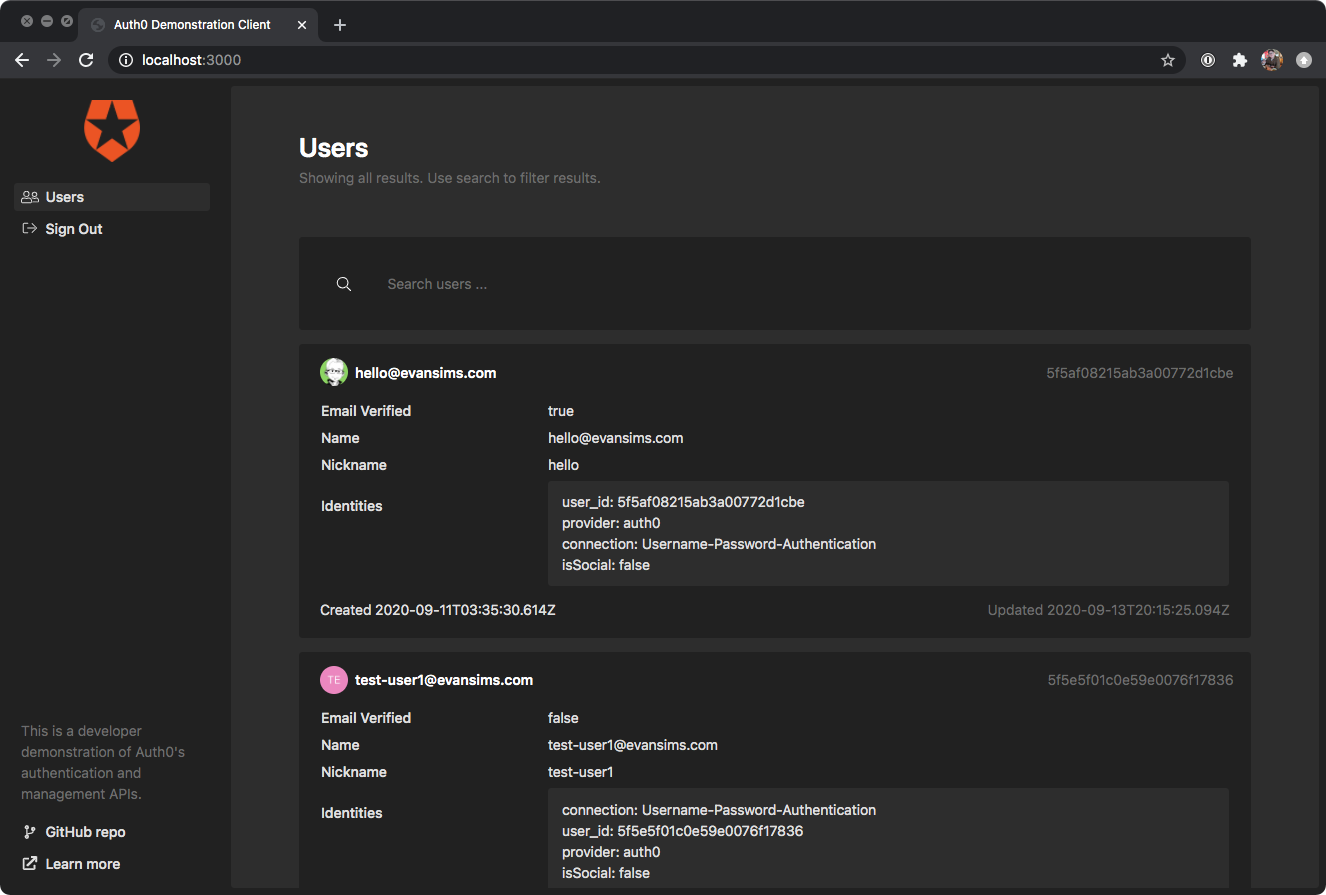
Thanks for your interest in my demonstration client of Auth0’s APIs. This is one half of a project demonstrating how one might go about implementing Auth0’s authentication API to interact with a custom backend.
In your new Application’s settings, make note of your unique Client ID and Domain. You will need these later.
Set the ‘Allowed Callback URLs’ endpoint to http://localhost:3000/callback.
Save your Application settings changes.
Configure our client
On your machine, within the cloned directory of this repository, open the config/environment.js file.
Find the auth0 section.
Set your clientId and domain to the values you made note of when you set up your Auth0 Application (above.)
Set your audience to match the Audience of the Auth0 API you noted while configuring the backend server.
Save the file.
Build the client
This project assumes you have an existing Docker installation to simplify getting started. However, if you already have a working Ember CLI installation on your local machine you can build the project using the standard command line tools if you prefer.
We’ll be using docker-sync to help streamline the build process across platforms. Once you have docker-sync installed, open your shell to the cloned repository on your local machine and run:
$ docker-sync-stack start
This will begin a file sync to the Docker container and start the build process. This may take a few minutes to complete.
Once the build is done, your frontend will be accessible at http://localhost:3000 on your local machine.
To terminate the build process at any time, simply close the shell process, which on most platforms is usually accomplished by pressing CTRL+C.
The application route (app/routes/application.js) is the root route and always the first route called in an Ember app.
We use this opportunity to have Auth0’s SPA SDK check if the user has already authenticated. This automatically happens when we create the Auth0Client instance in our Session service’s getSession method.
We have a method for getting some basic information about the authenticated user, getUser.
Quickstarts for a variety of use cases, languages and respective frameworks can be found here.
Contributing
Pull requests are welcome!
Security Vulnerabilities
If you discover a security vulnerability within this project, please send an e-mail to Evan Sims at hello@evansims.com. All security vulnerabilities will be promptly addressed.
License
This demonstration project is open-sourced software licensed under the MIT license.
This Go program demonstrates the use of interface-typed objects that are declared to link some functions to their specified struct. This technique, although using the property of interface-typed objects, is not the same as demonstrated here where interface-typed arguments are passed into functions. As for the code in this repository, we can use functions as methods for the created structs since we are not passing interface-typed objects as conventional argument, but we are using them as receiver arguments instead.
Program manual
Since this program is very similar to the one in the repository in this link, I’m just going to copy-paste the program manual from there as the following:
When run, the program asks the user to input the following information in the following order:
Note title
Note content
Todo
Then, the program will show messages containing the input information and, if there’s no error, will notify the user that the note and todo are successfully saved (in json file format).
There is no input validation for this program because every piece of information are in the form of free text. However, the program is designed to catch error when saving the files. The user will be notified if there’s any error while saving each file. In case of error, the program will stops after displaying the error message.
Code structure
Although, the program in this project works exactly the same as the one from this link, the code structure was designed differently in order to demonstrate another way of using interface to link common methods to different struct types from different packages.
The project comprises the main.go file which contains the code of the main program, and the codes which make up the note and todo packages. The main.go file contains the code declaring interface objects that link the save and display functions in the mentioned packages to their native structs. Those functions can, in turn, be used as the structs’ methods.
Program flow
Since this program works exactly as another one in a different repository as mentioned in several places above, I’m just going to copy an paste the same program flow from there as the following:
The user inputs the note title as a string
The user inputs the note content as a string
The program takes those inputs to create a struct which stores the note title, content, and the timestamp at its creation
The user inputs the todo text
The program takes the todo text input to create another struct which stores the todo text (without any title)
The program displays messages to confirm the note’s title and its content from the inputs
The program displays a message to confirm the todo
The program displays a message to notify the user that it’s saving the note
The program attempts to save the inputs as a json file with json field names according to the struct tags given in the code
The program displays the message that it saves the file successfully
The program repeat the same process from 8. for the todo (the todo’s file name is already hard-coded in the program and can’t be changed)
A Discord bot that translates regular text into UwU-speak.
Examples
English
UwU
Hello, world!
Hewlo, wowld! UwU!
Lorem ipsum dolar sit amet
Lowem ipsum dolaw sit amet UwU!
I’ll have you know I graduated top of my class in the Navy Seals
I’wl have you knyow I gwawduatewd top of my class in dwe Nyavy Seals UwU!
Commands
uwu*that – Uwuify a message in chat. Reply to a message to uwuifiy it.
uwu*this – Uwuify text. The rest of the message will be uwuified.
uwu*me – Follow the sender and translate everything that they say in the current channel.
uwu*stop [where] – Stop following the sender. Optionally set where to “channel”, “server”, or “everywhere” to stop following in the current channel, current server, or in all of Discord, respectively. Defaults to “channel”.
uwu*stop_everyone [where] – Stop following everyone in the current channel or server. Optionally set where to “channel” or “server” to specify where to stop following. Defaults to “channel”. Requires “Manage Messages” permission.
uwu*them <user> – Follow a specified user and translate everything that they say in the current channel. Requires “Manage Messages” permission. Use the command again to stop following.
Configuration
The bot can be configured through a JSON configuration file, located at /opt/UwuBot/appsettings.Production.json by default.
You must add your Discord token here before using the bot.
If you are using the the install script, then a default configuration file will be provided for you.
To create a configuration file manually, start with this template:
The following options are available to customize the bot behavior:
Option
Description
Default
BotOptions:CommandPrefixes
List of command prefixes to respond to.
[ "uwu*" ]
UwuOptions:AppendUwu
Appends a trailing “UwU!” to the text.
true
UwuOptions:MakeCuteCurses
Replaces curse words with cuter, more UwU versions.
true
Discord Requirements (OAuth2)
To join the bot to a server, you must grant permissions integer 2048. This consists of:
bot scope
Send Messages permission
You must also grant the “Message Content” intent in the Discord Developer Portal.
System Requirements
.NET 6+
Windows, Linux, or MacOS. A version of Linux with SystemD (such as Ubuntu) is required to use the built-in install script and service definition.
Setup
Before you can run discord-uwu-bot, you need a Discord API Token.
You can get this token by creating and registering a bot at the Discord Developer Portal.
You can use any name or profile picture for your bot.
Once you have registered the bot, generate and save a Token.
Ubuntu / SystemD Linux
For Ubuntu (or other SystemD-based Linux systems), an install script and service definition are provided.
This install script will create a service account (default uwubot), a working directory (default /opt/UwuBot), and a SystemD service (default uwubot).
This script can update an existing installation and will preserve the appsettings.Production.json file containing your Discord Token and other configuration values.
Compile the bot or download pre-built binaries.
Run sudo ./install.sh.
[First install only] Edit /opt/UwuBot/appsettings.Production.json and add your Discord token.
Run sudo systemctl start uwubot to start the bot.
Other OS
For non-Ubuntu systems, manual setup is required.
The steps below are the bare minimum to run the bot, and do not include steps needed to create a persistent service.
Compile the bot or download pre-built binaries.
Edit appsettings.Production.json and add your Discord token.
Run dotnet DiscordUwuBot.Main.dll to start the bot.
The Paho JavaScript Client is an MQTT browser-based client library written in Javascript that uses WebSockets to connect to an MQTT Broker.
Project description:
The Paho project has been created to provide reliable open-source implementations of open and standard messaging protocols aimed at new, existing, and emerging applications for Machine-to-Machine (M2M) and Internet of Things (IoT).
Paho reflects the inherent physical and cost constraints of device connectivity. Its objectives include effective levels of decoupling between devices and applications, designed to keep markets open and encourage the rapid growth of scalable Web and Enterprise middleware and applications.
Please do not link directly to this url from your application.
Building from source
There are two active branches on the Paho Java git repository, master which is used to produce stable releases, and develop where active development is carried out. By default cloning the git repository will download the master branch, to build from develop make sure you switch to the remote branch: git checkout -b develop remotes/origin/develop
The project contains a maven based build that produces a minified version of the client, runs unit tests and generates it’s documentation.
To run the build:
$ mvn
The output of the build is copied to the target directory.
Tests
The client uses the Jasmine test framework. The tests for the client are in:
src/tests
To run the tests with maven, use the following command:
$ mvn test
The parameters passed in should be modified to match the broker instance being tested against.
The client should work in any browser fully supporting WebSockets, http://caniuse.com/websockets lists browser compatibility.
Getting Started
The included code below is a very basic sample that connects to a server using WebSockets and subscribes to the topic World, once subscribed, it then publishes the message Hello to that topic. Any messages that come into the subscribed topic will be printed to the Javascript console.
This requires the use of a broker that supports WebSockets natively, or the use of a gateway that can forward between WebSockets and TCP.
// Create a client instancevarclient=newPaho.MQTT.Client(location.hostname,Number(location.port),"clientId");// set callback handlersclient.onConnectionLost=onConnectionLost;client.onMessageArrived=onMessageArrived;// connect the clientclient.connect({onSuccess:onConnect});// called when the client connectsfunctiononConnect(){// Once a connection has been made, make a subscription and send a message.console.log("onConnect");client.subscribe("World");message=newPaho.MQTT.Message("Hello");message.destinationName="World";client.send(message);}// called when the client loses its connectionfunctiononConnectionLost(responseObject){if(responseObject.errorCode!==0){console.log("onConnectionLost:"+responseObject.errorMessage);}}// called when a message arrivesfunctiononMessageArrived(message){console.log("onMessageArrived:"+message.payloadString);}
Breaking Changes
Previously the Client’s Namepsace was Paho.MQTT, as of version 1.1.0 (develop branch) this has now been simplified to Paho.
You should be able to simply do a find and replace in your code to resolve this, for example all instances of Paho.MQTT.Client will now be Paho.Client and Paho.MQTT.Message will be Paho.Message.
You need to have cabal, Haskell installed. Then run the following commands
To run the program you need gcc for the C version and SPIM for the MIPS version
# clone the repo and move to it
git clone https://github.com/tttardigrado/hsfuck
cd hsfuck
# build the project using cabal
cabal build
# optionally move the binary into another location with# cp ./path/to/binary .# run the compiler# (fst argument is compilation target mode. Either c or mips)# (snd argument is the path of the src file)# (trd argument is the path of the output file)
./hsfuck c test.bf test.c
# compile and run the C code
gcc test.c
./a.out
Suggestion: Add the following snippets to your .bashrc
# compile brainfuck to c and then to binarybfC()
{
./hsfuck c $1 /tmp/ccode.c
gcc /tmp/ccode.c -o $2
}
GSC Logger: A Tool To Log Google Search Console Data to BigQuery
Google App Engine provides a Cron service for logging daily Google Search Console(GSC): Search Analytics data to BigQuery for use in
Google Data Studio or for separate analysis beyond 3 months.
Configuration
This script runs daily and pulls data as specified in config.py file to BigQuery. There is little to configure without some programming experience.
Generally, this script is designed to be a set-it-and-forget-it in that once deployed to app engine, you should be able to add your service account
email as a full user to any GSC project and the Search Analytics data will be logged daily to BigQuery. By default the data is set to pull from GSC 7 days earler every day
to ensure the data is available.
Note: This script should be deployed on the Google Account with access to your GSC data to ensure it is available to Google Data Studio
Note: This script has not been widely tested and is considered a POC. Use at your own risk!!!
Note: This script only works for Python 2.7 which is a restriction for GAE currently
Go to the Task Queue tab in AppEngine and
click on Cron Jobs to verify that the daily cron is set up correctly. The job should have a Run Now button next to it.
4. Verify App
Once deployed, you should be able to load your GAE deployment url in a browser and see a screen that lists your service account email and also attached GSC sites. This screen will also list the last cron save date for each site
that you have access to.
License
Licensed under the Apache License, Version 2.0 (the “License”);
you may not use this file except in compliance with the License.
You may obtain a copy of the License at
Unless required by applicable law or agreed to in writing, software
distributed under the License is distributed on an “AS IS” BASIS,
WITHOUT WARRANTIES OR CONDITIONS OF ANY KIND, either express or implied.
See the License for the specific language governing permissions and
limitations under the License.